3D-Printing Model Documentation
Every model I make starts out with sketches. From there, I make a technical drawing with specs before even touching the modeling software. This helps in numerous ways: It clarifies my vision, which is handy later when I have issues with the model, and having an idea and a purpose helps brainstorm and choose solutions. This process also forces me to think about model dimensions and how pieces will fit together.
This early documentation gives me the ability to proceed with confidence, as I’ve likely ironed out the major wrinkles before starting the project.
Furthermore, I often use my blog to document projects as I go, sharing pictures, screenshots, and notes about the process. I would say I do a lot of documenting. And yet it seems there’s still more to do.
If you want people to be able to use your modeling files effectively, you need a process called 3d Product Documentation. This essential process involves taking down information and leaving it in a folder along with the STL files.
But where is all this information? Where does it belong in the file? How do I put it in the file anyway? And critically, what kind of information should the documents have? I turned to the Internet to find out.
I began by researching the type of information a modeler should document. There’s an awful lot, a miserable lot really, whoa. And yet how else is the user supposed to know if the model is meant for PLA or PETG, or how it’s licensed, or even the author’s name (in order to find other things by that author) if the modeler doesn’t include documentation?
A more advanced set of specs might include notes on preferred infill types, amount of filament used in grams, or post-processing notes, extra work on the part of the modeler, but a better experience for the user.
Because this work is important, but also repetitive, I am going to create two downloadable ‘3D model documentation’ forms, the fancy kind that you can fill in, save, and re-use. You may have them, free of charge.
The first is basic documentation, AKA the Quick Start, which reads exactly like it says: documentation with the bare minimum information needed for the user to be able to successfully print. It includes multiple sections.
If your model has a lot of detail or needs some special instructions, or maybe you just want to provide the best chance of a great model, standard documentation, AKA the Spec Sheet, is probably a better choice. I included options like ‘density patterns’, support information, and assembly notes, lots of little bits of information.
It’s my hope that these interactive PDF forms make documenting the process less work for you :)
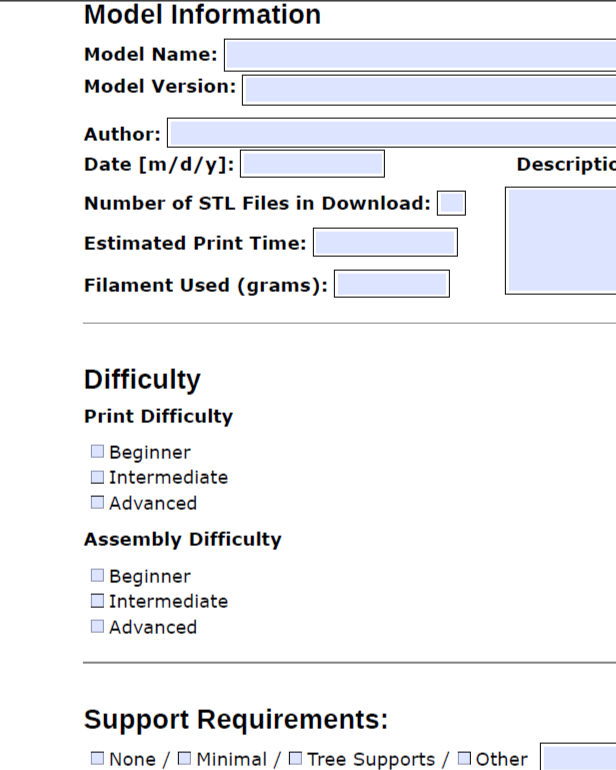
Quick-Start Front Page
Page One of Three
Quick-Start Documentation: Maker Edition
The first section asks for the model name, version, and author, along with the date, number of STL files, print time, and grams of filament used.
The second part has checkboxes for print difficulty, assembly difficulty, and support requirements.
There are checkboxes for the various license types.
The next section is for the printer, and includes the type of filament, type of printer, nozzle size, layer height, and print orientations. There’s also some space for build details.
After that, a section for vitamins (non-printable essentials) and hardware.
Lastly, space for assembly instructions.
Thumbnails and images should be added to the same file that contains the 3D model files and documentation.
Standard Documentation: Workshop Edition
The first three parts, including model and author info, print difficulty and support requirements, and licensing checkboxes, are exactly the same as the Maker Edition.There is an introductory section, with lots of room for sharing the model’s purpose and explanation, along with another space to share a quick overview of the build process.
Additional lines have been added to the printer settings section, for notes or special instructions.
An entire slicer settings section has been added, including information on walls, top and bottom layers, optimal infill, print speed, brim or raft recommendations, and notes.
The section for build details covers infill patterns, external fill patterns, infill density, and a large space for notes.
There is space provided for a written description of prient orientations, and any notes about that.
There is a good-sized space for tolerance notes.
The vitamins and essentials section includes a Bill of Materials, basically a list of everything needed to make or build this item.
This document also has a space for revision history.
I added the documents for download below, in the footer, so people can find them easily and don’t have to sign up for anything to get them. I’ll post revisions here as I do them. Happy modeling!